1Shortcut: P · Movable Center
Place Vertex Directly Over Any Corner
Drag the protractor hub ring over the vertex of an on-screen diagram, CAD PDF, or pasted photo. Press P anytime to show or hide the protractor.
Drag the vertex center anywhere on screen or over a photo, sweep Ray A and Ray B independently across 360°, and read exact interior and reflex angles.
Origin (0, 0) · Top-Left Dashed Datum
Align your object with the 0 tick mark. Click any ruler or grid to drop draggable measurement guides.
100% Client-Side Photo & Clipboard Ruler
Press Ctrl+V to paste a screenshot, drop an image here, or choose a file. Nothing is ever uploaded.
Display Density Calibration · Saved Locally Per Screen
Browsers default to 96 CSS pixels per inch, which rarely matches physical display panels. Choose one of the three calibration methods below so every millimeter and fractional inch tick corresponds to actual physical length.
96.0 PPI·3.780 px/mm
CSS reference scale (96 px per inch)
Hold any standard payment card, driver’s license, or national ID card flat against the outline below and match its physical width.
Place Physical Card Here
Align left & top edges · Match outer border
Optical Alignment Checklist
Computed Scale: 96.0 CSS PPI · 3.780 px/mm
Keyboard fine-tuning: click the card stage and press ← → (Shift for 5px steps).
Enter the diagonal measurement of your visible screen panel in inches (corner to corner inside the bezel, not the outer laptop chassis). Ensure browser page zoom is at 100%.
Accuracy notes for diagonal calibration:
Online Ruler Plus inspects your browser’s reported logical screen dimensions, device pixel ratio, orientation, and platform to match known hardware profiles or compute a sensible initial estimate.
Why verify manually? Web browsers do not expose physical monitor sizes over HDMI/DisplayPort or custom OS scaling factors. Always verify with a physical card or known diagonal before critical measurements.
Physical Verification Gauge
Hold a real coin against these live-scaled reference outlines to confirm your calibration immediately.
Local Session Log
Place two parallel guide lines in the ruler workspace and click Save to History to record point-to-point spans (ΔX / ΔY) locally on your device.
Screen Angle Metrology · Dual-Ray Precision
Built for geometry homework, woodworking miter cuts, slope roof pitches, CAD verification, and X-ray or anatomical angle checks.
Drag the protractor hub ring over the vertex of an on-screen diagram, CAD PDF, or pasted photo. Press P anytime to show or hide the protractor.
Unlike fixed 180° templates, both Ray A and Ray B rotate independently around 360° so you never have to tilt slanted drawings upright first.
Add angled floating rulers alongside the protractor to measure mitered board lengths and angles in one workspace, saved automatically in local storage.
Interactive Motion Guide
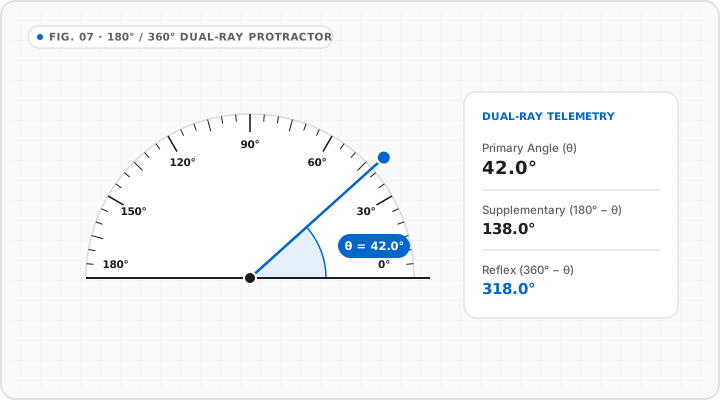
Sweep the second ray around the center vertex to read primary, supplementary, and reflex angles simultaneously.
θ = atan2(ΔY, ΔX)Angle Classification & Geometry Guide
Angle measurement depends strictly on XY pixel coordinates, so circular angle readings stay exact even before running screen PPI calibration.
The subtle arc highlights the interior sweep (0°–180°) while letting you inspect supplementary 180°−θ complements and full 360° bearings.
Focus either draggable ray handle and use arrow keys for precise single-step rotation tuning without mouse slip.
For a 90° corner joint, split your measured vertex angle in half to find the exact chop-saw miter setting.
| Angle Type | Degrees (°) | Complement / Slope | Common Application |
|---|---|---|---|
| Right Angle (Square) | 90.0° | 90° corner | Cabinetry, framing & PCB orthogonals |
| Standard Miter Cut | 45.0° | 1:1 slope (100%) | Picture frames & 90° baseboard corners |
| Hexagon Interior | 120.0° | 60° exterior | Hex bolts, honeycomb & isometric grid |
| Isometric Axis | 30.0° | 57.7% pitch | 3D technical axonometric drafting |
| Octagon Miter | 22.5° | 135° interior | Bay windows & octagonal trim |
| Roof Pitch 4/12 | 18.4° | 33.3% slope | Residential gable rafters |
| Pentagon Interior | 108.0° | 72° exterior | Polygon star & tile geometry |
| Straight Angle | 180.0° | Flat line | Edge collinearity alignment check |
Protractor accuracy requires isotropic 1:1 square monitor pixels (standard on modern LCD/OLED panels).
Switch Ruler Axis or Unit Scale
Metric · cm
1 cm & 0.5 cm scale + cm-to-inch chart
Imperial · 1/16″
1/2, 1/4, 1/8, 1/16″ fractions
Fine Pitch · mm
1 mm & 5 mm hardware scale
Top & Bottom
Wide spans & CSS pixel (px) scale
Left & Right
Upright height & mobile portrait
Related Editorial Guides
Deep-dive walkthroughs and conversion charts for this ruler mode.
Protractor FAQ
No. Because modern displays use square pixels (1:1 aspect ratio), atan2(ΔY, ΔX) angular measurements remain accurate regardless of monitor diagonal size or OS scaling.
Yes! Paste an image with Ctrl+V or click Photo inside the toolbar, then keep the Protractor active to measure joints, roof slopes, or CAD parts.
Both rays move freely through all 360° and the vertex can be dragged anywhere over the stage, removing the need to rotate tilted objects horizontally.
Yes. Combine the 360° Protractor with draggable ΔX/ΔY guides or floating angled rulers inside the same calibrated workspace.