CSS vs Physical
Why Browsers Hide True Monitor Size
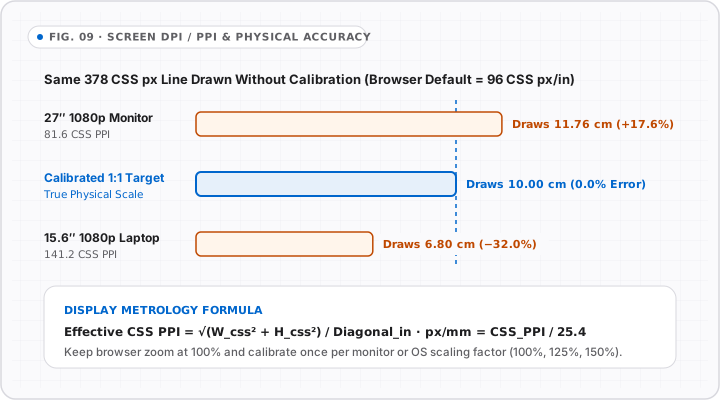
Privacy standards prevent websites from reading monitor EDID dimensions or OS DPI percentages directly. Online browsers report CSS reference pixels and Device Pixel Ratio.
Display Metrology Telemetry · 100% Local
Read your browser’s live CSS viewport, device pixel ratio, and physical dimensions, then apply your screen diagonal straight into Online Ruler Plus calibration.
Live Browser Signal
Calculated Display Geometry
CSS vs Physical
Privacy standards prevent websites from reading monitor EDID dimensions or OS DPI percentages directly. Online browsers report CSS reference pixels and Device Pixel Ratio.
Windows & macOS Scaling
When Windows scales at 125% or macOS uses Retina “Looks like” resolution, CSS pixel counts shrink while DPR increases—keep browser zoom at 100% when measuring.
Best Verification
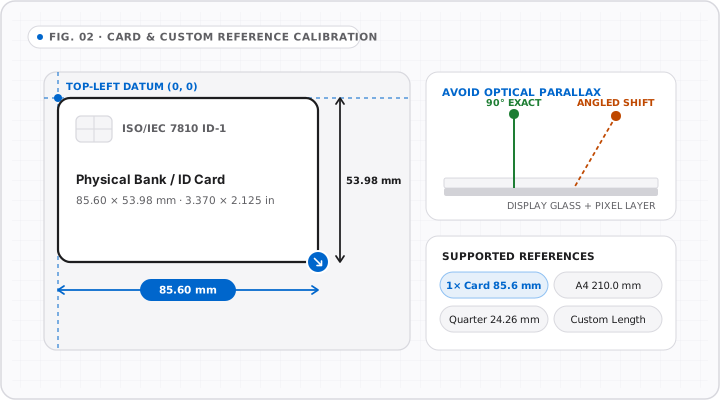
Even after applying a panel diagonal here, verify against an ISO/IEC 7810 ID-1 bank card in the calibration workspace for sub-millimeter certainty.
Display Scale Reference
Compare how identical CSS pixel counts stretch or shrink across uncalibrated monitors and high-DPI laptop screens.