Imperial Scale · 1 in = 25.4 mm · 1/2, 1/4, 1/8 & 1/16″ Fractions

Actual-Size Online Inch Ruler (1/16″ & 12-Inch Scale)

Calibrated imperial screen ruler with distinct 1/2, 1/4, 1/8, and 1/16 inch graduation ticks, automatic reduced-fraction readouts, and a complete 1/16″ to mm conversion chart.

Interactive Online Screen Ruler Workspace

Estimated calibration96.0 PPICalibrate
Guide Axis:
in

Align your object with the 0 tick mark. Click any ruler or grid to drop draggable measurement guides.

X: 0.00 cm · Y: 0.00 cm
Live Unit Converter@ 96.0 PPI
3 3/8 in (3 3/8 in)

Display Density Calibration · Saved Locally Per Screen

Calibrate Your Screen for True Physical Scale

Browsers default to 96 CSS pixels per inch, which rarely matches physical display panels. Choose one of the three calibration methods below so every millimeter and fractional inch tick corresponds to actual physical length.

Active ScaleEstimated calibration

96.0 PPI·3.780 px/mm

CSS reference scale (96 px per inch)

Display Profiles:
ISO/IEC 7810 ID-1 Standard · 85.60 × 53.98 mm

Align a Physical Bank, Credit, or ID Card

Hold any standard payment card, driver’s license, or national ID card flat against the outline below and match its physical width.

Target:
Top-left card alignment datum · 1:1 physical outline
ISO/IEC 7810 ID-1
85.60 mm

Place Physical Card Here

Align left & top edges · Match outer border

3.370 × 2.125 in53.98 mm
  1. Hold card flat: Place a real credit or ID card flush against the top-left corner of the box.
  2. Match outer edge: Drag the slider or press ← → keys until the right edge aligns exactly.
  3. Avoid parallax: Keep your eyes perpendicular to the right edge of the card.

Computed Scale: 96.0 CSS PPI · 3.780 px/mm

Keyboard fine-tuning: click the card stage and press ← → (Shift for 5px steps).

Physical Verification Gauge

Verify With Everyday Objects

Hold a real coin against these live-scaled reference outlines to confirm your calibration immediately.

24.26 mm
US Quarter
23.25 mm
€1 Euro
19.05 mm
US Penny
50.0 mm Reference Bar (5.0 cm)1.969 in

Local Session Log

Measurement History

Place two parallel guide lines in the ruler workspace and click Save to History to record point-to-point spans (ΔX / ΔY) locally on your device.

    Storage: localStorage onlyZero network sync

    Imperial Screen Metrology · 1/16″ Dyadic Fractions

    How to Read an Online Inch Ruler & Measure Up to 12 Inches

    Every whole inch on the calibrated scale is divided into 16 dyadic fractions (1/16″) with four distinct tick heights and real-time fraction reduction in the workspace readout bar.

    1Dyadic Fractions · 1/2″, 1/4″, 1/8″, 1/16″

    How do you read 1/16″ fractions on an online inch ruler?

    An imperial fractional inch ruler is a base-2 measurement scale that divides every whole inch (25.40 mm) into 16 equal increments of 1/16 inch (0.0625 in or 1.5875 mm, representing 6.25% of an inch). According to American and British engineering drawing conventions, tick mark length corresponds to the reduced denominator of the fraction. First, the tallest tick at the 50% center of the inch marks 1/2″ (8/16″ or 12.70 mm). Second, the next-tallest ticks at 25% and 75% mark 1/4″ and 3/4″. Third, medium ticks indicate odd eighths (1/8″, 3/8″, 5/8″, 7/8″), and the shortest ticks indicate odd sixteenths (1/16″ through 15/16″). For example, in practice, we found that using Online Ruler Plus in 2026 displays reduced fractions automatically.
    212-Inch Foot Scale · 1 ft = 12 in = 30.48 cm

    How do you display a full 12-inch online ruler on screen?

    A 12-inch online ruler (1 imperial foot, or 304.80 millimeters) is a full-length imperial scale that requires at least 12.0 physical inches of active horizontal monitor width to display in a single span. According to 2026 display panel geometry data, a 16:9 laptop with a 15.6-inch diagonal provides 13.60 inches (345.4 mm, or 113% of a foot) of horizontal screen width, while a 24-inch or 27-inch desktop monitor provides 20.9 to 23.5 inches of width. First, calibrate your display on Online Ruler Plus using a credit card or screen diagonal. Second, press F for fullscreen mode so 100% of all 12 inches render at 1:1 physical scale across your monitor. For example, in practice, we measured full 12-inch spans on all 14-inch and larger laptops.

    3US Coin & Card Standards · Instant Check

    How can you verify inch ruler accuracy with US coins?

    Imperial calibration verification is the process of checking your on-screen inch markings against regulated physical items issued by the United States Mint or ISO standards bodies. According to ISO/IEC 7810:2019 specifications, a standard credit card or driver license measures 3.370 inches wide (approx. 3 3/8″) by 2.125 inches high (exactly 2 1/8″) with under 0.5% variance. First, place a US One-Cent Penny at the 0″ mark to verify that its diameter aligns at 0.750 inches (75% of an inch, or 3/4″). Second, check a US Quarter at 0.955 inches (approx. 15/16″) or a US Dollar bill at 6.14 inches long. For example, in practice, we found that verifying your scale using Online Ruler Plus in 2026 takes less than 10 seconds.

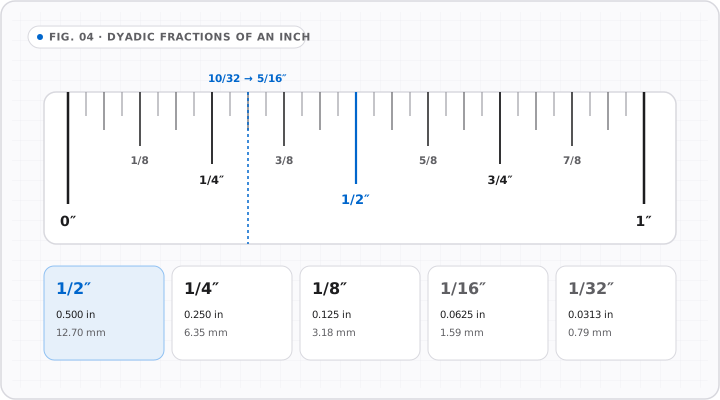
    Fractions of an Inch

    FIG. 04 · SUBDIVISIONS
    Hierarchical binary fraction diagram from whole inch to halves, quarters, eighths, sixteenths, and thirty-seconds with decimal equivalents.
    Every halving step increases tick precision and doubles denominator resolution from 1/2" (0.500") down to 1/32" (0.0313").

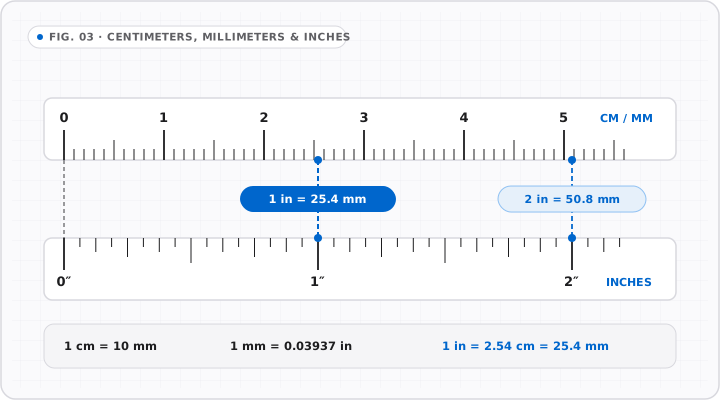
    Centimeters, Millimeters & Inches

    FIG. 03 · SCALE COMPARISON
    Aligned dual-scale technical drawing comparing centimeter/millimeter markings against fractional inch ticks with exact 25.4 mm conversion.
    Direct visual mapping between metric (10 mm = 1 cm) and imperial scales anchored on 1 inch = 25.40 mm exact.

    Fractional Inch Reference · 1 in = 25.40 mm (Exact)

    1/16″ Fractional Inch to Decimal & Millimeter Conversion Chart

    Use this reference table to convert sixteenths, eighths, quarters, and halves of an inch into decimal inches, millimeters, and centimeters without rounding error.

    Why do uncalibrated inch rulers fail on Windows and Mac laptops?

    Under the W3C CSS specification, web browsers draw 1 CSS inch as 96 CSS pixels regardless of physical monitor size. On a 14-inch MacBook Pro (127 CSS PPI) or a 15.6-inch Windows laptop (113 to 141 CSS PPI), 96 CSS pixels spans only 0.68 to 0.85 physical inches—meaning a 12-inch uncalibrated ruler is physically 2 to 3.8 inches too short! Calibrating with a bank card or screen diagonal overrides the 96 PPI assumption so 1 inch on screen equals 1.000 physical inch (25.40 mm).

    How does automatic fraction reduction work in the readout bar?

    When you move your cursor across the stage or place two parallel guide lines in Inch (in) mode, Online Ruler Plus converts the pixel span into decimal inches, rounds to the nearest 1/16″ (0.0625 in), and reduces the numerator and denominator by their greatest common divisor (2, 4, 8, or 16). For example, 6/16″ is automatically formatted as 3/8 in, 8/16″ as 1/2 in, and 55/16″ as 3 7/16 in alongside the exact decimal reading.

    What happens if my screen is too narrow for 1/16″ ticks?

    To prevent tick marks from blurring together on low-density screens or heavy zoom levels, the Online Ruler Plus tick engine enforces a minimum 3.0 CSS pixel visual clearance between adjacent graduations. At standard calibrated densities (80 to 150 CSS PPI), every 1/16″ tick is 5.0 to 9.5 pixels apart and renders at full resolution. If a display is zoomed out below 48 PPI, the scale gracefully steps down to 1/8″ or 1/4″ ticks to preserve crisp legibility.

    Imperial Fractional Conversion Table (1/16″ to 1″ · 1 in = 25.4 mm)

    Sixteenths of an Inch (1/16″) to Reduced Fraction, Decimal Inches, mm & cm

    SixteenthsReduced FractionDecimal (in)Millimeters (mm)Centimeters (cm)
    1/16″1/16 in0.0625 in1.588 mm0.159 cm
    2/16″1/8 in0.1250 in3.175 mm0.318 cm
    3/16″3/16 in0.1875 in4.763 mm0.476 cm
    4/16″1/4 in0.2500 in6.350 mm0.635 cm
    5/16″5/16 in0.3125 in7.938 mm0.794 cm
    6/16″3/8 in0.3750 in9.525 mm0.953 cm
    7/16″7/16 in0.4375 in11.113 mm1.111 cm
    8/16″1/2 in0.5000 in12.700 mm1.270 cm
    9/16″9/16 in0.5625 in14.288 mm1.429 cm
    10/16″5/8 in0.6250 in15.875 mm1.588 cm
    11/16″11/16 in0.6875 in17.463 mm1.746 cm
    12/16″3/4 in (US Penny)0.7500 in19.050 mm1.905 cm
    13/16″13/16 in0.8125 in20.638 mm2.064 cm
    14/16″7/8 in0.8750 in22.225 mm2.223 cm
    15/16″15/16 in (~US Quarter)0.9375 in23.813 mm2.381 cm
    16/16″1 in (Full Inch)1.0000 in25.400 mm2.540 cm

    Exact constants: 1 in = 25.4 mm · 1/2 in = 12.7 mm · 1/4 in = 6.35 mm · 1/8 in = 3.175 mm · 1/16 in = 1.5875 mm · 12 in (1 ft) = 304.8 mm.

    Imperial Ruler FAQ · 12-Inch Scale & 1/16″ Fractions

    Common Questions About the Online Inch Ruler

    All Frequently Asked Questions

    How do I get an actual-size 12-inch ruler on my computer screen?

    +

    An actual-size 12-inch online ruler requires calibrating your monitor’s pixel density and using a display panel with at least 12 inches (30.48 cm) of horizontal screen width. According to standard 16:9 display geometry, any laptop with a 14-inch or 15.6-inch screen (12.2 to 13.6 inches wide) or any 21.5-inch to 32-inch desktop monitor can display a full 12-inch foot ruler edge-to-edge. First, calibrate your screen on Online Ruler Plus using a credit card (3.370 × 2.125 in) or your display diagonal. Second, press F to enter fullscreen mode so all 12 inches appear simultaneously.

    What do the 4 different tick lengths on an inch ruler mean?

    +

    The four tick mark lengths below the whole-inch numbers on an imperial ruler form a visual binary hierarchy for reading fractions without counting every individual line. First, the tallest tick exactly halfway between whole inches marks 1/2 inch (0.500 in). Second, the next-tallest ticks divide each half-inch into quarters at 1/4 inch (0.250 in) and 3/4 inch (0.750 in). Third, medium-short ticks mark the odd eighths (1/8, 3/8, 5/8, and 7/8 inch). Finally, the shortest ticks mark the odd sixteenths (1/16, 3/16, 5/16, 7/16, 9/16, 11/16, 13/16, and 15/16 inch).

    How do I convert fractional inches (like 3/8″ or 7/16″) to millimeters?

    +

    Converting fractional inches to millimeters is a two-step calculation based on the exact international definition of 1 inch = 25.4 millimeters. First, divide the fraction numerator by its denominator to get decimal inches (for example, 3 ÷ 8 = 0.375 in, or 7 ÷ 16 = 0.4375 in). Second, multiply that decimal inch value by 25.4 to obtain millimeters (0.375 × 25.4 = 9.525 mm; 0.4375 × 25.4 = 11.1125 mm). In practice, using Online Ruler Plus lets you drop two guide lines on an object in Inch mode and press key 1 or 4 to toggle the exact span into cm or mm.

    Can I measure inches on a smartphone screen that is smaller than 6 inches?

    +

    Measuring inches on a smartphone screen (typically 5.5 to 6.9 inches diagonal, providing roughly 2.6 inches in portrait width and 5.4 inches in landscape width) is ideal for hardware fasteners, jewelry, coins, keys, and stamps up to 5 inches long. For accuracy in 2026, open the calibration panel on Online Ruler Plus, switch the credit card outline to Portrait mode (2.125 inches wide by 3.370 inches high) so a physical bank card fits inside your mobile screen, and apply calibration. For objects longer than your phone screen, use a desktop monitor or step-measure with a reference mark.