Quick Answer
In Microsoft Word for the web (Word Online), switch to Editing mode, click the View tab, and check Ruler to display the horizontal margin ruler. In PowerPoint for the web (PowerPoint Online), the standard layout Ruler toggle does not exist—use automatic Smart Guides, the Draw tab ink ruler, or Open in Desktop App.
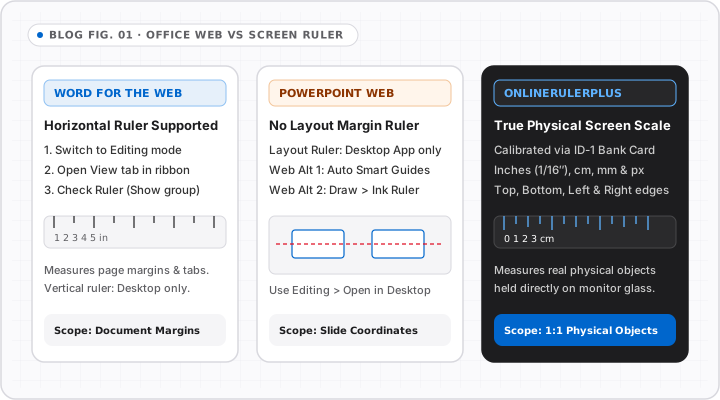
Many users confuse the layout rulers inside Microsoft Office web apps with standalone screen measurement tools. Because Word for the web (Word Online) and PowerPoint for the web (PowerPoint Online) implement a streamlined ribbon compared to desktop Microsoft 365, the ruler setting sits in different places—or behaves differently altogether.
How to View or Add a Ruler in Word Online
In Microsoft Word for the web, you can display the horizontal margin and indent ruler in three quick clicks:
- Look at the top-right corner of the Word Online toolbar and make sure the document is in Editing mode (not Viewing or Reviewing).
- Select the View tab in the ribbon.
- Click the Ruler checkbox (or toggle) to turn the horizontal ruler on above your document page.
Important Limitations in Word for the Web
- Horizontal ruler only: Word Online displays the horizontal ruler (margins, first-line indent, hanging indent, and tab stops). The vertical left-edge ruler remains a Word Desktop feature.
- Changing inches vs. centimeters: Measurement unit changes (inches, cm, mm) live inside desktop Word (
File > Options > Advanced > Display) or your Microsoft account regional locale settings rather than a quick ribbon button in the browser. - No physical scale guarantee: Zooming Word Online to 100% does not automatically make 1 inch on the document ruler equal 1 physical inch on your laptop screen unless your OS display scaling and screen PPI match. If you need true physical dimensions before printing, verify on our calibrated Online Ruler.
How to Show a Ruler in PowerPoint Online
Unlike desktop PowerPoint (View > Show > Ruler), PowerPoint for the web does not expose the standard horizontal and vertical layout ruler. Instead, Microsoft provides three practical alternatives depending on what you need to accomplish:
| Goal in PowerPoint Online | Built-in Web Option | Exact Steps |
|---|---|---|
| Align shapes & text boxes evenly | Smart Guides | Drag any object on the canvas; red dashed alignment and equal-spacing guides appear automatically. |
| Measure slide proportions on screen | XY Quadrant / Online Ruler | Open XY Quadrant Guides or our Print Scale Guide to check physical proportions. |
| Adjust exact guides & slide ruler | Open in Desktop App | Click Editing > Open in Desktop App (if desktop Office is licensed), then enable View > Ruler. |
| Sketch straight geometric lines | Draw > Ruler | Open the Draw tab in supported touch/pen views to rotate a digital straightedge on canvas. |
Measuring Document Elements Outside Office
If you only opened Word Online or PowerPoint Online to check whether a flyer, badge, or label fits a physical envelope (4 × 6 in, DL, or A5), measuring inside a word-processor zoom box often misleads you.
Instead, export a screenshot or test image and measure ratios in Photo Ruler, or verify screen dimensions directly on the Online Ruler homepage. For a quick overview of Office and general ruler FAQs, you can also browse the dedicated OnlineRulerPlus FAQ hub.
Interactive Tools on OnlineRulerPlus
Try It in the Calibrated Workspace
Questions & Answers
Frequently Asked Questions
How do I add a ruler in Word Online if the View tab option is missing?
+
Check two requirements in Word for the web: first, switch from Viewing mode to Editing mode in the top-right toolbar; second, ensure you are in Print Layout view rather than Reading View. Once Editing + Print Layout are active, open View -> Ruler to show or hide the horizontal ruler.
Does Word Online have a vertical ruler on the left side?
+
No. Word for the web displays the horizontal margin and tab-stop ruler above the page, while the vertical side ruler is only available in the Microsoft Word desktop application for Windows and macOS.
How do you show a ruler in PowerPoint Online?
+
PowerPoint for the web does not currently include the desktop View -> Ruler layout toggle. To align shapes cleanly in a browser, drag objects to trigger the red dashed Smart Guides, use Draw -> Ruler for straight lines on touch/pen devices, or click Editing -> Open in Desktop App for full horizontal and vertical rulers.
Standards & Verified Sources
- Microsoft Support — Show or hide the ruler in Word — Covers View -> Ruler behavior in Word desktop and Word for the web.
- Microsoft Support — Compare PowerPoint features on different platforms — Documents layout ruler availability between PowerPoint desktop and PowerPoint for the web.