Quick Answer
Align one edge of your object with the zero mark (0)—not the outer edge of the ruler if there is a margin—then read the largest whole number passed and count the smaller tick marks after it: tenths (0.1 cm / 1 mm) on the metric edge, or binary fractions (1/2, 1/4, 1/8, 1/16) on the imperial inch edge.
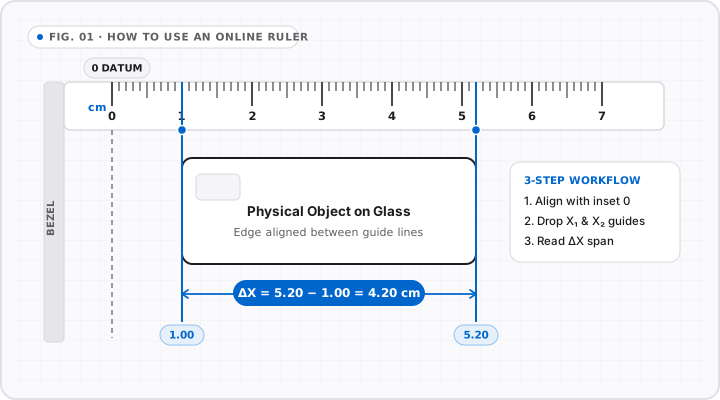
Reading a ruler quickly without miscounting comes down to two habits: starting cleanly at the zero line and recognizing tick-mark hierarchy by line height. Whether you are holding a wooden school ruler, a pocket steel rule, or using an online ruler on your monitor, the reading logic never changes.
Metric edges divide every centimeter into ten equal millimeters, making metric readings linear and decimal-friendly. Imperial edges divide every inch repeatedly in half—producing 1/2, 1/4, 1/8, and 1/16 subdivisions—which requires reading line lengths rather than counting ten equal ticks.
Step 1: Always Locate the Zero Mark First
Before looking at where an object ends, inspect where the measurement scale starts:
- Offset-zero rulers: Wooden and plastic classroom rulers typically start the
0line a few millimeters inward from the physical end. If you butt a bolt or screw against the plastic edge instead of the0line, every measurement will be short. - Flush-zero rulers: Steel machinist rules and OnlineRulerPlus place the
0line flush with the left edge so an object pressed gently against your screen starts at exact zero. - Avoid parallax error: Position your eyes straight above the edge you are reading. Viewing from an angle shifts the apparent tick alignment by 1–2 mm on thick rulers or recessed laptop displays.
Step 2: How to Read Metric (Centimeters and Millimeters)
The metric side is the fastest system to read because it never changes base:
| Mark Appearance | Unit Value | Decimal cm Equivalent | Example Reading |
|---|---|---|---|
| Longest numbered line | 1 centimeter (cm) | 1.0 cm | 4 cm |
| Medium half-mark (5th tick) | 5 millimeters (mm) | 0.5 cm | 4.5 cm (45 mm) |
| Shortest minor tick | 1 millimeter (mm) | 0.1 cm | 4.7 cm (47 mm) |
To read a metric measurement, note the last numbered centimeter line to the left of the object’s edge, then count the small millimeter ticks past it. Notice the slightly taller tick halfway between each centimeter—that marks 5 mm (0.5 cm) so you only ever need to count forward or backward by 1 to 4 ticks. Need pure millimeters? Switch directly to our Millimeter Ruler or Centimeter Ruler.
Step 3: How to Read Imperial Inches
On a standard US/UK/Canadian/Australian dual ruler, each inch is split by line height, not by tens:
- 1 inch (longest line): Numbered
1, 2, 3...across the scale. - 1/2 inch (second longest): One line centered halfway between whole inches.
- 1/4 inch (medium-long): Divides each half-inch into quarters (
1/4,3/4). - 1/8 inch (medium-short): Divides quarters into eighths (
1/8,3/8,5/8,7/8). - 1/16 inch (shortest on standard rulers): Sixteen equal spaces per inch (
1/16,3/16,5/16, etc.).
Practical shortcut: Never count all 16 tiny lines from zero. Instead, find the nearest quarter or half line (1/4, 1/2, 3/4) and count just one sixteenth forward or backward. For a deep visual breakdown of every fraction, read Ruler Tick Marks Explained: 1/2, 1/4, 1/8, 1/16 & 1/32 Inch.
Practical Measurement Examples Across Regions
- Small fastener or coin (Metric): A UK 20p coin measures 21.4 mm (
2.14 cm) across—just past two whole centimeters and one small millimeter tick. - Craft trim or hardware (Imperial): Three ticks past the
2inch mark on a 16ths ruler equals2 3/16"(approximately55.6 mm). - On-screen sizing (Both systems): When checking dimensions directly on your monitor, calibrate once via our Calibration Guide so an object held up to your laptop matches physical reality.
Common Mistakes to Avoid
- Reading 1/10 inch as metric: Some engineering rulers carry decimal-inch (
1/10") scales. Always verify the unit label (cm/mmvsin) before assuming ten ticks equal 1 cm. - Writing unreduced fractions: Report
4/16"as1/4"and6/16"as3/8". - Skipping calibration on screen: Browsers default to CSS
96 PPI, whereas modern laptops often pack110–227 PPI. Use our online ruler calibration workflow before measuring physical parts against your screen.
Interactive Tools on OnlineRulerPlus
Try It in the Calibrated Workspace
Measure directly on screen in calibrated inches, centimeters, and millimeters.
Centimeter & Millimeter Ruler →Metric-focused screen ruler with crisp 1 mm increments and draggable guidelines.
Inch Ruler (Fractions & Decimals) →Imperial ruler displaying 1/16 inch ticks alongside decimal inches.
Questions & Answers
Frequently Asked Questions
How do I read a ruler online accurately?
+
First calibrate your screen using a physical ISO/IEC 7810 ID-1 card (85.60 mm × 53.98 mm) or known reference so pixels match real-world scale. Then place the left edge of your object flat against the 0 mark, read the whole inch or centimeter line immediately before the object's right edge, and count the smaller tick marks to add the fractional or millimeter remainder.
Why should I align with the zero mark instead of the end of the ruler?
+
Many physical rulers leave a small blank gap of 2 to 5 mm before the zero tick mark to protect the numbers from edge wear, whereas zero-flush rulers and calibrated on-screen rulers place 0 directly at the starting edge. Always visually confirm where the 0 line sits before measuring.
Which edge of a standard dual ruler is metric and which is inches?
+
On a standard 12-inch / 30-centimeter dual ruler, the imperial side is numbered 0 through 12 with 16 or 32 subdivisions per inch, while the metric side is numbered 0 through 30 with 10 subdivisions (millimeters) per centimeter.
Standards & Verified Sources
- NIST — SI Units: Length — Official metric length definitions and conversion factor (1 inch = 25.4 mm exact).
- BIPM — The International System of Units (SI) — Authoritative international definitions for meter, centimeter, and millimeter.