Quick Answer
Yes, a camera can measure objects either through live AR depth estimation on mobile phones or by taking a flat overhead photo beside a known reference (like an 85.60 mm credit card) and scaling points in a browser Photo Ruler—which avoids AR jitter for flat small-to-medium objects.
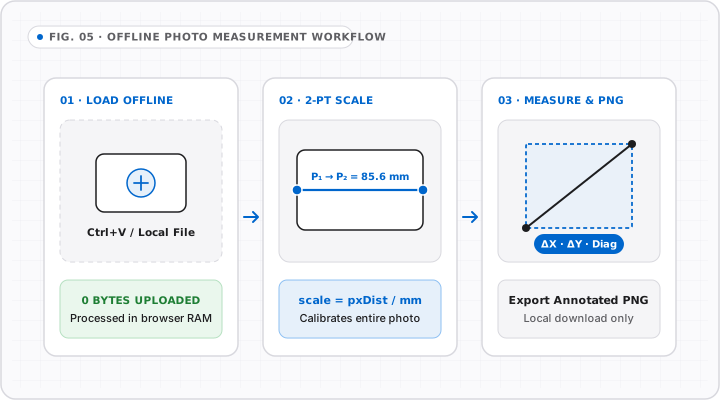
Searching for an online ruler camera tool usually means one of two very different things: waving a live smartphone camera around a room with Augmented Reality (AR), or taking one steady snapshot of a part next to a coin and measuring it accurately.
OnlineRulerPlus focuses on the second method—static two-point photo measurement via Photo Ruler—and keeps your screen clear of clunky live-camera permission prompts or server uploads. Here is how both camera methods work and when to pick each.
How Live Camera AR Rulers Work (And Where They Struggle)
Built-in mobile tools like Apple Measure combine camera frames, inertial sensors (accelerometer/gyroscope), and LiDAR depth maps (on supported Pro iPhones/iPads) to track 3D points in space.
- Best fit: Rooms, countertops, ceilings, doorways, and boxes larger than
30 cm(12 in) where±1–2%is acceptable. - Common weakness: Subtle hand sway makes pinning a corner within
1 mmon a tiny key, watch lug, or PCB connector frustrating. Low lighting or blank matte desks also cause tracking points to drift.
How Two-Point Photo Measurement Works in Photo Ruler
Photogrammetry for flat objects only needs one reference length lying in the same plane:
- Lay your object flat next to an ISO/IEC 7810 ID-1 payment card (
85.60 mm×53.98 mm) or minted coin. - Step back ~
35–45 cm(14–18 in) using your phone’s 1x or 2x lens (never ultra-wide0.5x, which bends straight lines near the frame edges). - Point the camera straight down so the table surface fills the frame evenly without tilt.
- Open Photo Ruler, drop in or paste (
Ctrl+V) the image, draw the calibration line across the card, enter85.6 mm, and measure any edge or angle across the target.
Because all image processing stays inside your browser canvas, private labels, ID documents (or household photos) never leave your device.
Four Rules That Eliminate Perspective Error
| Error Source | What Happens | Quick Fix |
|---|---|---|
| Tilted camera angle | Distant edge shrinks; near edge stretches | Align lens flat above the middle between card and object |
| Different elevation height | Object taller than table reads larger than the card | Prop the card up on a coaster or stack of paper to match target height |
Ultra-wide (0.5x) lens |
Barrel distortion curves lines near edges | Use standard 1x or slight 2x crop from farther back |
| Edge shadows | Hard shadows hide exact corner pixels | Use diffuse overhead light on a plain matte background |
When your item fits directly onto a phone or desktop screen (< 12–30 cm), skip the camera altogether and measure straight against our calibrated Online Ruler.
Interactive Tools on OnlineRulerPlus
Try It in the Calibrated Workspace
Questions & Answers
Frequently Asked Questions
Can I use my camera as a ruler right inside a web browser?
+
OnlineRulerPlus does not stream live camera AR video. Instead, our Photo Ruler lets you snap a photo with your phone or webcam, open or paste (Ctrl+V) the static image in your browser, calibrate a reference span (like a credit card or coin), and measure dimensions locally without uploading files to a server.
Why is static photo scaling often steadier than live camera AR for small objects?
+
Live camera AR apps estimate depth from hand motion or LiDAR point clouds, which works well for walls and sofas but often jitters by several millimeters on small parts. A flat, perpendicular photo beside a hard reference object freezes motion completely so you can zoom in and click exact pixel edges.
How do I stop camera lens distortion from skewing photo measurements?
+
Shoot straight down perpendicular to the table, keep both the reference card and target object centered near the middle of the frame (avoiding wide-angle 0.5x lenses), and ensure both sit on the same flat surface plane.
Standards & Verified Sources
- NIST — Dimensional Metrology Overview — Foundational principles of optical reference scaling and parallax/perspective error.
- OnlineRulerPlus Photo Ruler Tool — Client-side HTML5 canvas two-point image measurement workflow.