Quick Answer
Yes, you can use your phone as a ruler in three practical ways: open a calibrated web ruler directly on your smartphone screen for objects under 12–15 cm, measure larger objects using a flat photo with a credit-card reference, or use built-in iOS/Android AR tools for room-scale distances.
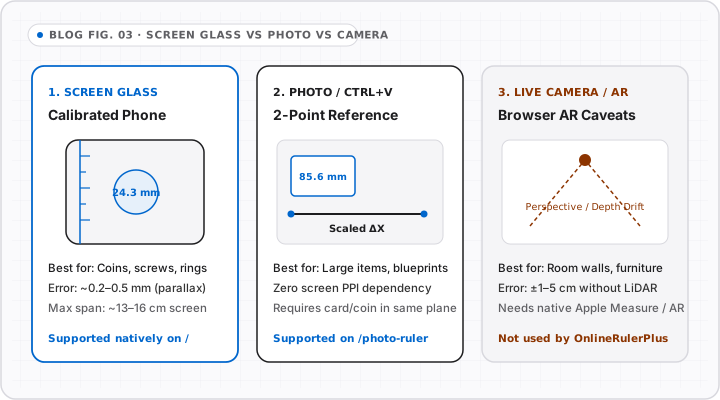
Every modern smartphone already carries a high-contrast glass edge, crisp tick rendering, and a camera sensor capable of sharp close-ups—meaning you do not need to install an ad-heavy ruler app to measure an object reliably.
Depending on whether your target is smaller than your phone or bigger than your desk, one of three methods will give you the tightest accuracy.
Method 1: Use Your Phone Screen as a Calibrated Online Ruler
For screws, rings, watch bands, SD cards, postage stamps, and cable plugs (anything up to ~14 cm / 5.5 inches), a mobile browser ruler is the cleanest option:
- Open OnlineRulerPlus in Safari or Chrome on your phone.
- Place any standard credit, debit, or transit card vertically or horizontally against the calibration slider and match the tick marks (
85.60 mm/3.37"). - Set the object directly beside the screen bezel (avoid pressing hard metal edges onto bare glass—place a thin strip of paper alongside the glass edge if measuring sharp bolts).
- Read inches, centimeters, or millimeters directly on screen, and use MM Ruler or Inch Ruler if you want only one scale.
Why calibration matters on phones: iPhone “Display Zoom” (Larger Text) and Android Display Size sliders intentionally scale CSS pixels up or down. An uncalibrated mobile ruler can easily read 12%–18% off until you match it once to a physical card.
Method 2: Take a Flat Photo + Use Photo Ruler (Best for Medium Objects)
When the object is larger than your phone screen—say, a laptop hinge, kitchen pan, shoe insole, or picture frame—do not “walk” your phone end-to-end across it (each lift introduces cumulative alignment error).
Instead:
- Set a credit card (
85.60 mm) or a sheet of Letter/A4 paper next to the object on a flat surface. - Snap a straight overhead photo in good light.
- Open Photo Ruler, mark the card’s two corners, enter
85.6 mm, and measure any dimension in the photo—all processed 100% locally in your browser with zero image uploads.
Method 3: Native Smartphone AR Apps (Only for Room-Scale Objects)
Built-in tools like Apple’s Measure app (using ARKit + LiDAR on Pro iPhones) excel at room-scale checks—doorways, sofas, bookshelves, and wall spacing—where ±1–2 cm tolerance is fine. For small craft items under 5 cm, AR depth estimation fluctuates noticeably, making a calibrated screen ruler or two-point Photo Ruler far steadier.
Quick Decision Table
| Object Size | Best Mobile Method | Typical Practical Range | Where to Start |
|---|---|---|---|
< 14 cm (< 5.5 in) |
Calibrated Phone Screen Ruler | Coins, screws, jewelry, cards | Online Ruler Home |
10 cm – 100 cm |
Overhead Photo + Reference Card | Frames, parts, envelopes, trims | Photo Ruler |
> 1 m (> 3 ft) |
Phone AR / Folding Measure | Furniture, walls, doorways | Device native Measure app |
Still wondering how live camera AR compares to browser photo measurement? Read our companion breakdown: Can You Use Your Camera as a Ruler? Live AR vs. Photo Measurement.
Interactive Tools on OnlineRulerPlus
Try It in the Calibrated Workspace
Questions & Answers
Frequently Asked Questions
Can a smartphone measure objects accurately without downloading an app?
+
Yes. Any modern iPhone or Android browser can run OnlineRulerPlus directly with no app install. Once you calibrate the display against a standard ID-1 card (85.60 mm wide), small hardware, jewelry, cables, and coins held beside the glass read cleanly down to 1 mm or 1/16 inch.
What is the biggest limit of using a phone screen as a ruler?
+
Display length and screen magnification. Most phones have 13 to 15.5 cm (5 to 6 inches) of usable screen height, and OS accessibility zoom or Display Zoom can shift uncalibrated CSS pixels by 10–15%. Always run a 10-second calibration first.
Does OnlineRulerPlus use my phone camera live like Apple Measure?
+
No. OnlineRulerPlus does not access your live camera feed or run ARKit/ARCore depth tracking. Instead, it offers both a calibrated screen ruler and a local Photo Ruler that measures static photos inside your browser using a two-point reference object.
Standards & Verified Sources
- W3C CSS Values & Units — Reference Pixel Definition — Explains why uncalibrated CSS inches rarely equal physical screen inches on mobile OLED displays.
- OnlineRulerPlus Calibration Guide — Device-specific calibration steps for phones, tablets, and desktop monitors.